Quick answer: after each mock, fill one row per section (attempts, correct, wrong, score, time), then one row per question that cost you marks or time, with a single root-cause tag and a “next time” action. Once a week, count the tags and pick the one pattern to fix.
Download the template (.xlsx) Four tabs: section summary, question log, weekly roll-up and the tag list, with the example below filled in. It opens in Excel, Google Sheets or Numbers, and the score and accuracy columns calculate themselves.
If you have not read it yet, our step-by-step guide to analysing a CAT mock explains the thinking behind each column. This page is the practical format.
Part 1: Section summary
Fill this in straight after the mock, before you look at solutions. It takes two minutes and gives you a number you can compare across mocks.
| Section | Attempted | Correct | Wrong | Score | Accuracy |
|---|---|---|---|---|---|
| VARC | 18 | 13 | 5 | 34 | 72% |
| DILR | 10 | 8 | 2 | 22 | 80% |
| QA | 14 | 9 | 5 | 22 | 64% |
Score is 3 × correct − 1 × wrong MCQs (TITA wrongs are zero). Accuracy is correct ÷ attempted. Add one line under the table: “How did it feel?” Write where you felt rushed or stuck. That note is often more useful than the numbers.
Part 2: Question log
One row per question that matters: every wrong answer, every skip you think you could have done, and every correct answer that took far too long. Do not log easy correct answers.
Question log columns
- Q: section and number, or set name (QA 12, DILR Set B, RC 3).
- Topic: the chapter or question type (Percentages, Para jumble, Seating).
- Result: wrong, skipped, or slow-correct.
- Time: your best guess in minutes.
- Tag: one root cause from the list below.
- Next time: the method, rule or check that would have saved it.
The mistake tags
Keep the list short so you can tag fast and count later. Pick the first cause you would need to fix.
- Concept: did not know the method.
- Calculation: right method, arithmetic slip.
- Misread: missed a word, unit, “not” or condition.
- Selection: should not have attempted it then.
- Time: could solve it, but stayed too long or ran out.
- Guess: attempted without real confidence.
If you find yourself inventing a new tag each mock, stop. Six is enough to see patterns.
A filled-in example
| Q | Topic | Result | Time | Tag | Next time |
|---|---|---|---|---|---|
| QA 4 | Mixtures | Wrong | 3 | Calculation | Check with options |
| QA 11 | Logs | Skipped | 1 | Concept | Revise log rules |
| QA 17 | Geometry | Slow-correct | 6 | Time | Leave at 3 min |
| DILR B | Bar chart | 2 wrong | 12 | Selection | Scan first |
| RC 2 Q3 | Inference | Wrong | 2 | Misread | Reread the question stem |
| VA 22 | Para jumble | Wrong | 3 | Guess | Skip TITA PJs below 2 links |
Six rows, about twenty minutes after the re-solve. Already you can see that QA lost marks to execution and timing, not concepts, which changes what you should practise this week.
Part 3: Weekly roll-up
One mock is noise. Patterns show up across three or four. Once a week, count your tags and topics:
Weekly roll-up
- Most common tag: e.g. Calculation (7 of 19 rows).
- Most common topic: e.g. Arithmetic, especially percentages.
- Accuracy trend: each section, this week vs last.
- One fix: the single change you will test in the next mock.
- Did last week’s fix work? yes, partly, or no, and why.
The last line is what turns a template into a training loop. Without it, you write the same conclusions every week.
The same log in Ocegik
If you would rather not keep a spreadsheet, Ocegik’s Error Log works the same way: mark each question right, wrong or skipped after a mock, pick a reason, and every miss lands in one list you can filter by section, topic or reason.
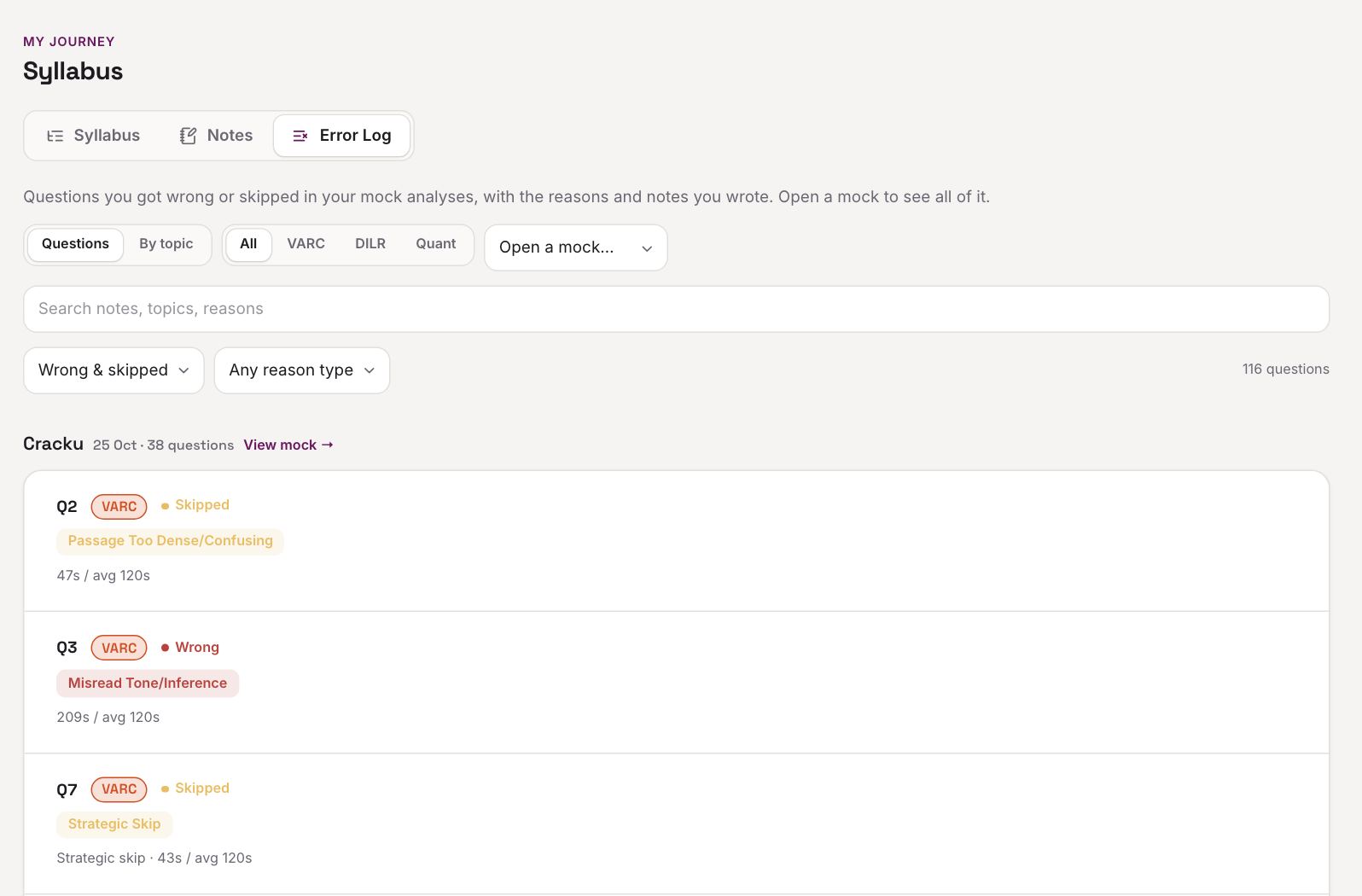
Log your mock in Ocegik, freeLog your mock in Ocegik
Copy-ready version
Download the template (.xlsx), or paste these into a sheet as headers or write them at the top of a notebook page.
Section summary
Section | Attempted | Correct | Wrong | Score | Accuracy | How it felt
Question log
Mock | Section | Q | Topic | Result | Time | Tag | Next time
Weekly roll-up
Week | Top tag | Top topic | Accuracy VARC / DILR / QA | One fix | Did last fix work?
Keep every mock on the same sheet so the roll-up is a simple filter or count, not a new document each time.
Frequently asked questions
Should I use a spreadsheet or a notebook?
Either works. A sheet makes counting tags easy; a notebook is faster to fill in. The best format is the one you will fill in after every mock.
How many questions should I log per mock?
Usually 10 to 25. If you are logging more than 30, you are probably logging easy correct answers or one-off slips that do not need a row.
Do I need separate templates for sectionals?
No. Use the same question log and mark the row as a sectional. Your weekly roll-up then includes both.
